UX Design
Case Study: Redesign of Digital Interface for Self-Checkout Kiosk at Loblaws
Case Study: Redesign of Digital Interface for Self-Checkout Kiosk at Loblaws
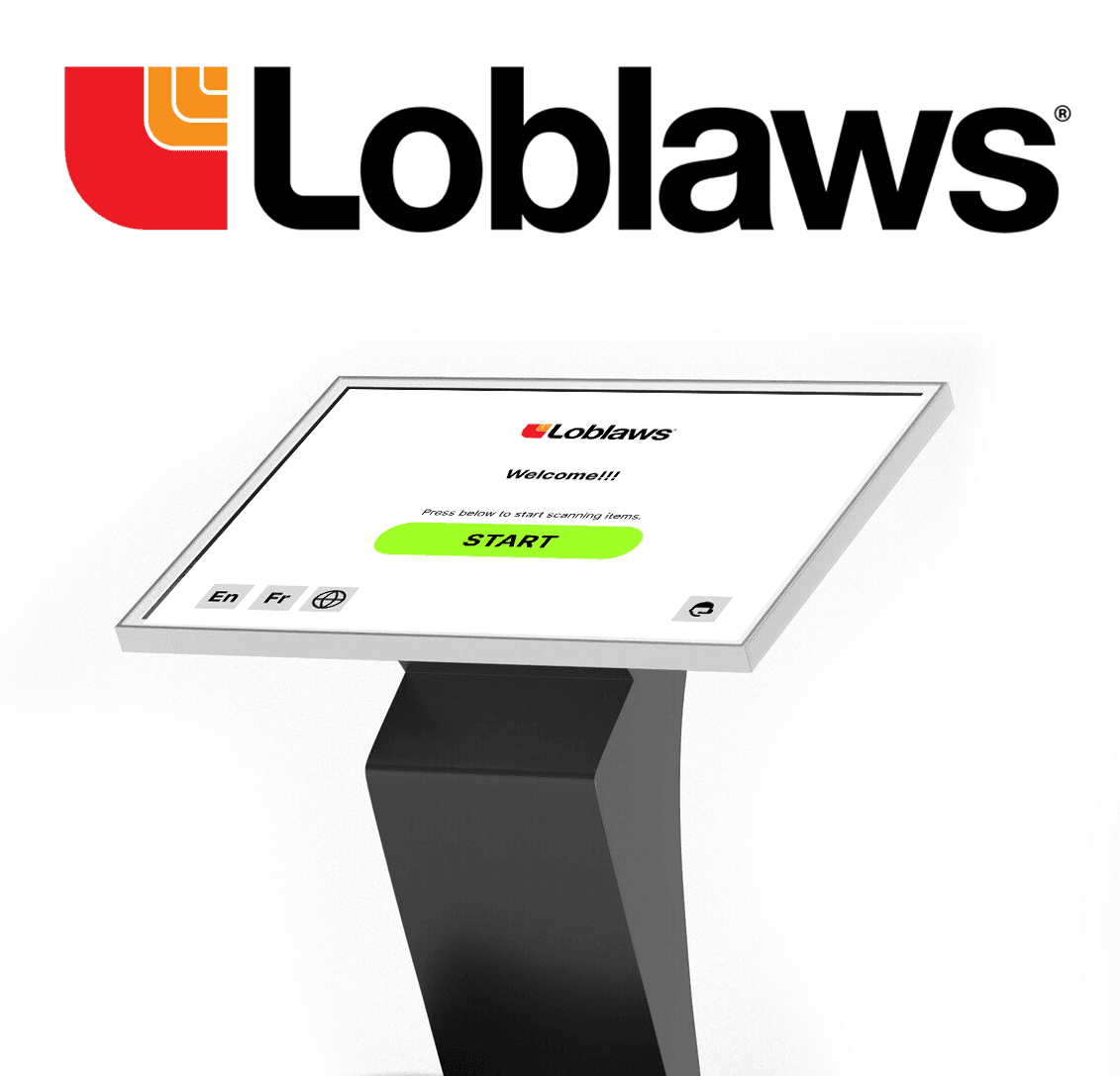
Product Brief
The scope of this project includes evaluating the existing self-checkout interface at Loblaws, identifying areas for improvement, and proposing a redesigned interface that is intuitive, efficient, and user-friendly. Our goals are to decrease user errors, accelerate the checkout process, and ultimately raise customer happiness.
Business
Objectives
Business
Objectives
Business
Objectives
Loblaws is redesigning their self-checkout interface to make shopping easier and more enjoyable for everyone, including tech-savvy customers and those with disabilities. By streamlining the process, they aim to reduce the need for staff help, cut costs, and speed up transactions, which should make the store run more smoothly and potentially boost sales. The new design also aims to cut down on theft and mistakes by making it harder to tamper with the system and easier to spot fraud, while clear weight cues help prevent errors and accidental theft.
Improving the self-checkout interface at Loblaws serves both customers and the business. The main goal is to enhance customer satisfaction and foster brand loyalty by catering to diverse preferences, including tech-savvy users and those with disabilities. Efficiency is prioritized to reduce staff interventions and enhance store productivity by minimizing wait times and potentially boosting sales. The redesign also addresses loss prevention by simplifying the interface to deter tampering and detect fraudulent activity, while clear weight cues help prevent accidental errors and theft.
Improving the self-checkout interface at Loblaws serves both customers and the business. The main goal is to enhance customer satisfaction and foster brand loyalty by catering to diverse preferences, including tech-savvy users and those with disabilities. Efficiency is prioritized to reduce staff interventions and enhance store productivity by minimizing wait times and potentially boosting sales. The redesign also addresses loss prevention by simplifying the interface to deter tampering and detect fraudulent activity, while clear weight cues help prevent accidental errors and theft.
Business
Objectives
Business
Objectives
Loss Prevention
Improving the self-checkout interface at Loblaws serves both customers and the business. The main goal is to enhance customer satisfaction and foster brand loyalty by catering to diverse preferences, including tech-savvy users and those with disabilities. Efficiency is prioritized to reduce staff interventions and enhance store productivity by minimizing wait times and potentially boosting sales. The redesign also addresses loss prevention by simplifying the interface to deter tampering and detect fraudulent activity, while clear weight cues help prevent accidental errors and theft.
Improving Store Productivity
Improving the self-checkout interface at Loblaws serves both customers and the business. The main goal is to enhance customer satisfaction and foster brand loyalty by catering to diverse preferences, including tech-savvy users and those with disabilities. Efficiency is prioritized to reduce staff interventions and enhance store productivity by minimizing wait times and potentially boosting sales. The redesign also addresses loss prevention by simplifying the interface to deter tampering and detect fraudulent activity, while clear weight cues help prevent accidental errors and theft.
Efficiency and Staff Intervention Reduction
Improving the self-checkout interface at Loblaws serves both customers and the business. The main goal is to enhance customer satisfaction and foster brand loyalty by catering to diverse preferences, including tech-savvy users and those with disabilities. Efficiency is prioritized to reduce staff interventions and enhance store productivity by minimizing wait times and potentially boosting sales. The redesign also addresses loss prevention by simplifying the interface to deter tampering and detect fraudulent activity, while clear weight cues help prevent accidental errors and theft.
Catering to Diverse Customer Preferences
Improving the self-checkout interface at Loblaws serves both customers and the business. The main goal is to enhance customer satisfaction and foster brand loyalty by catering to diverse preferences, including tech-savvy users and those with disabilities. Efficiency is prioritized to reduce staff interventions and enhance store productivity by minimizing wait times and potentially boosting sales. The redesign also addresses loss prevention by simplifying the interface to deter tampering and detect fraudulent activity, while clear weight cues help prevent accidental errors and theft.
Increased Customer Satisfaction
Improving the self-checkout interface at Loblaws serves both customers and the business. The main goal is to enhance customer satisfaction and foster brand loyalty by catering to diverse preferences, including tech-savvy users and those with disabilities. Efficiency is prioritized to reduce staff interventions and enhance store productivity by minimizing wait times and potentially boosting sales. The redesign also addresses loss prevention by simplifying the interface to deter tampering and detect fraudulent activity, while clear weight cues help prevent accidental errors and theft.
User Goals
User Goals
Accessible to All
It is crucial to be inclusive since consumers want interfaces that can accommodate diverse abilities which means having features like changing size of the font customizable to each individuals' preference, easy-to-understand instructions, and input methods like voice commands.
Accessible to All
It is crucial to be inclusive since consumers want interfaces that can accommodate diverse abilities which means having features like changing size of the font customizable to each individuals' preference, easy-to-understand instructions, and input methods like voice commands.
Easy Navigation
Customers want user interfaces that lead them through the checkout process with ease. They want error-free scans, seamless weight recognition, and simplified processes that exclude pointless prompts or steps.
Easy Navigation
Customers want user interfaces that lead them through the checkout process with ease. They want error-free scans, seamless weight recognition, and simplified processes that exclude pointless prompts or steps.
Control and Autonomy
Consumers appreciate independence and self-sufficiency. This includes clear feedback throughout the process allowing them to resolve minor issues on their own without requiring assistance right away. The addition of language selection also creates a hassle-free experience.
Control and Autonomy
Consumers appreciate independence and self-sufficiency. This includes clear feedback throughout the process allowing them to resolve minor issues on their own without requiring assistance right away. The addition of language selection also creates a hassle-free experience.
Target Audience
Target Audience
Time pressed customers
Individuals with limited time, like busy professionals or parents with young children
Time pressed customers
Individuals with limited time, like busy professionals or parents with young children
Privacy conscious shoppers
People who prefer the lack of interaction with cashiers or other customers.
Privacy conscious shoppers
People who prefer the lack of interaction with cashiers or other customers.
Customers with Disabilities
Users with disabilities who may face challenges in traditional checkout lanes.
Customers with Disabilities
Users with disabilities who may face challenges in traditional checkout lanes.
Smaller purchases
People with just a few items that find self-checkout faster
Smaller purchases
People with just a few items that find self-checkout faster
Research Methods
Research Methods
Research Methods
Observations
Competitive review
I analyzed the self-checkout interfaces at Shoppers Drug Mart to identify best practices and potential areas for improvement. I noticed a couple of areas that needed improvement compared to our competitors. For instance, I found that Shoppers Drug Mart offers an option to easily request a shopping bag and prominently displays the bags in front of the self-checkout machines. However, our competitors have more crucial information displayed on their screens, such as a clear "call for help" button.
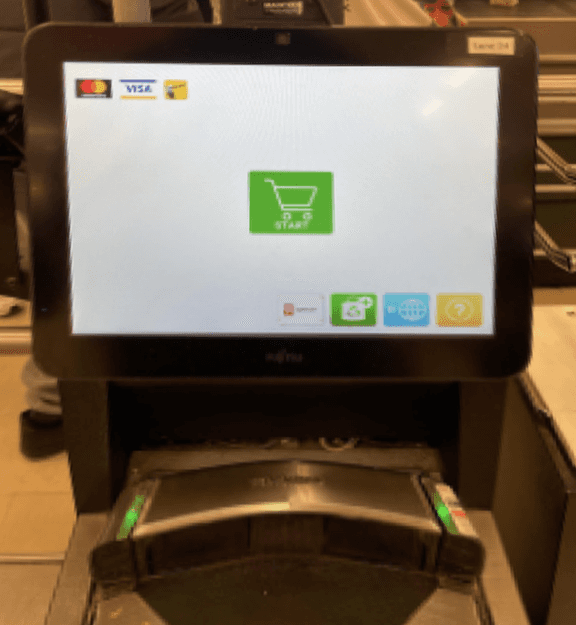
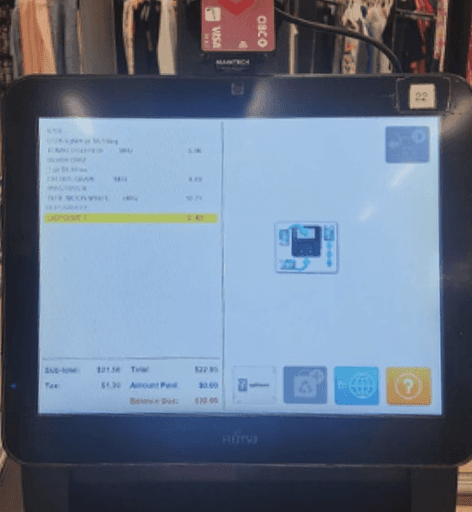
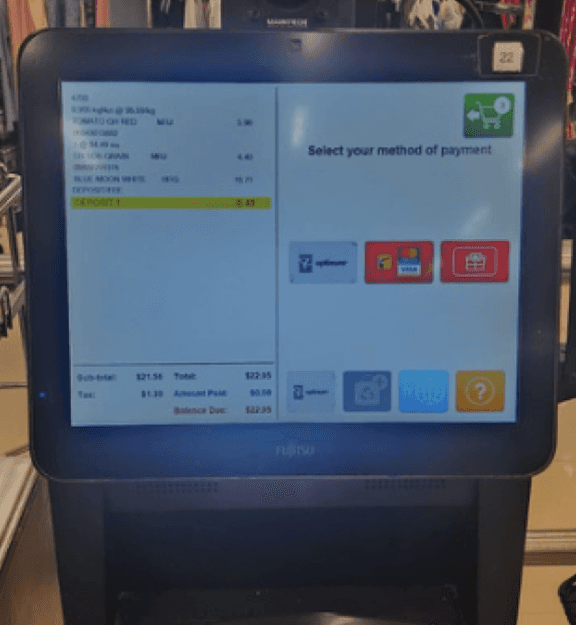
I conducted user research by observing interactions with the existing interface to pinpoint common issues and pain points. To facilitate this study, I visited Loblaws and purchased a diverse range of items for checkout. These items included those with barcodes, items without barcodes, and alcoholic beverages. By deliberately selecting varied items, I aimed to understand the scanning process and its challenges. Through this exercise, I gained firsthand insights into user challenges and the factors shaping their interactions with the self-checkout machine.
Competitive review
Observations
I conducted user research by observing interactions with the existing interface to pinpoint common issues and pain points. To facilitate this study, I visited Loblaws and purchased a diverse range of items for checkout. These items included those with barcodes, items without barcodes, and alcoholic beverages. By deliberately selecting varied items, I aimed to understand the scanning process and its challenges. Through this exercise, I gained firsthand insights into user challenges and the factors shaping their interactions with the self-checkout machine.
I analyzed the self-checkout interfaces at Shoppers Drug Mart to identify best practices and potential areas for improvement. I noticed a couple of areas that needed improvement compared to our competitors. For instance, I found that Shoppers Drug Mart offers an option to easily request a shopping bag and prominently displays the bags in front of the self-checkout machines. However, our competitors have more crucial information displayed on their screens, such as a clear "call for help" button.
Competitive
Review
Observations
I conducted user research by observing interactions with the existing interface to pinpoint common issues and pain points. To facilitate this study, I visited Loblaws and purchased a diverse range of items for checkout. These items included those with barcodes, items without barcodes, and alcoholic beverages. By deliberately selecting varied items, I aimed to understand the scanning process and its challenges. Through this exercise, I gained firsthand insights into user challenges and the factors shaping their interactions with the self-checkout machine.
I analyzed the self-checkout interfaces at Shoppers Drug Mart to identify best practices and potential areas for improvement. I noticed a couple of areas that needed improvement compared to our competitors. For instance, I found that Shoppers Drug Mart offers an option to easily request a shopping bag and prominently displays the bags in front of the self-checkout machines. However, our competitors have more crucial information displayed on their screens, such as a clear "call for help" button.
Opportunities for Improvement
Opportunities for
Improvement
No Payment Confirmation
1
No Payment Confirmation
1
Add Barcode for Fruit
2
Add Barcode for Fruit
2
Voice Feedback Missing
3
Voice Feedback Missing
3
Alcohol Popup Screen Redesign
4
Alcohol Popup Screen Redesign
4
Lack of Language Options
5
Lack of Language Options
5
Auto Scene Card Scan for Points
6
Auto Scene Card Scan for Points
6
Common Assistance Button
7
Common Assistance Button
7
Add Bag Button anytime
8
Add Bag Button anytime
8
No Feedback Section
9
No Feedback Section
9
Common Assistance Button
Alcohol Popup Screen Redesign
Scan for Liquor (Self ID Scan)
Voice Feedback Missing
Auto Scene Card Scan for Points
Add Bag Button
No Feedback Section
Add Barcode for Fruit
No Payment Confirmation
Lack of Language Options
User Flow
User Flow
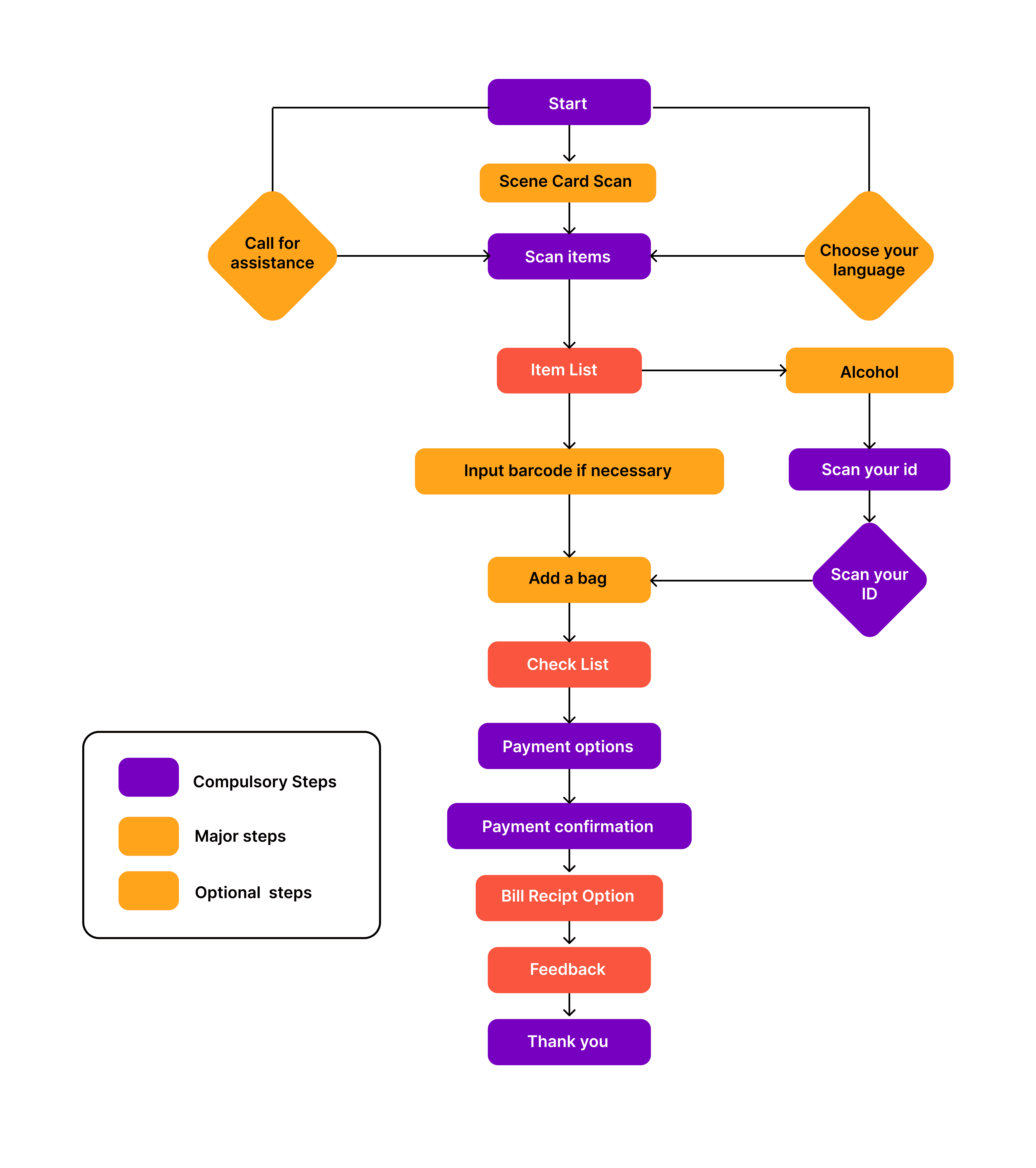
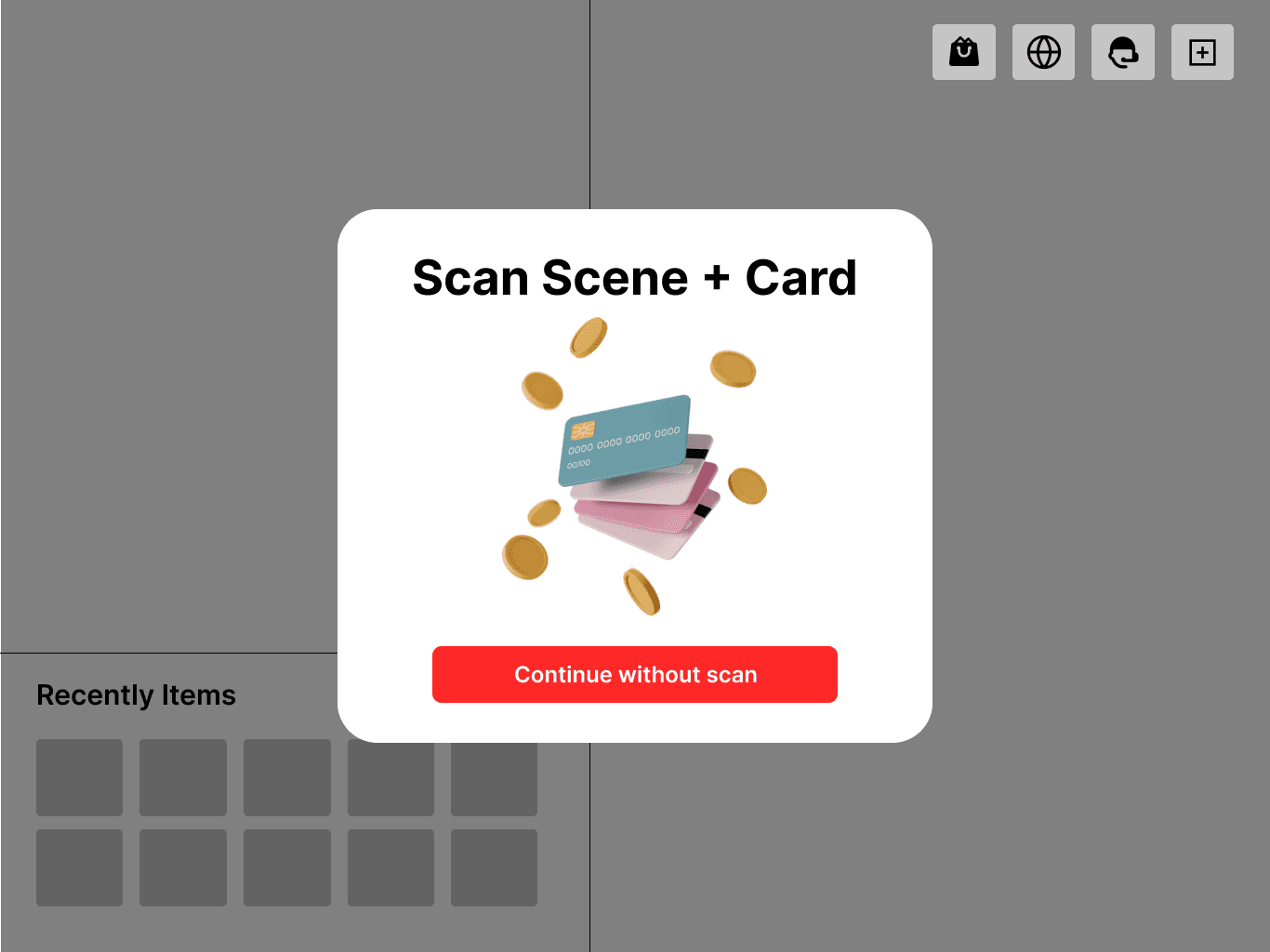
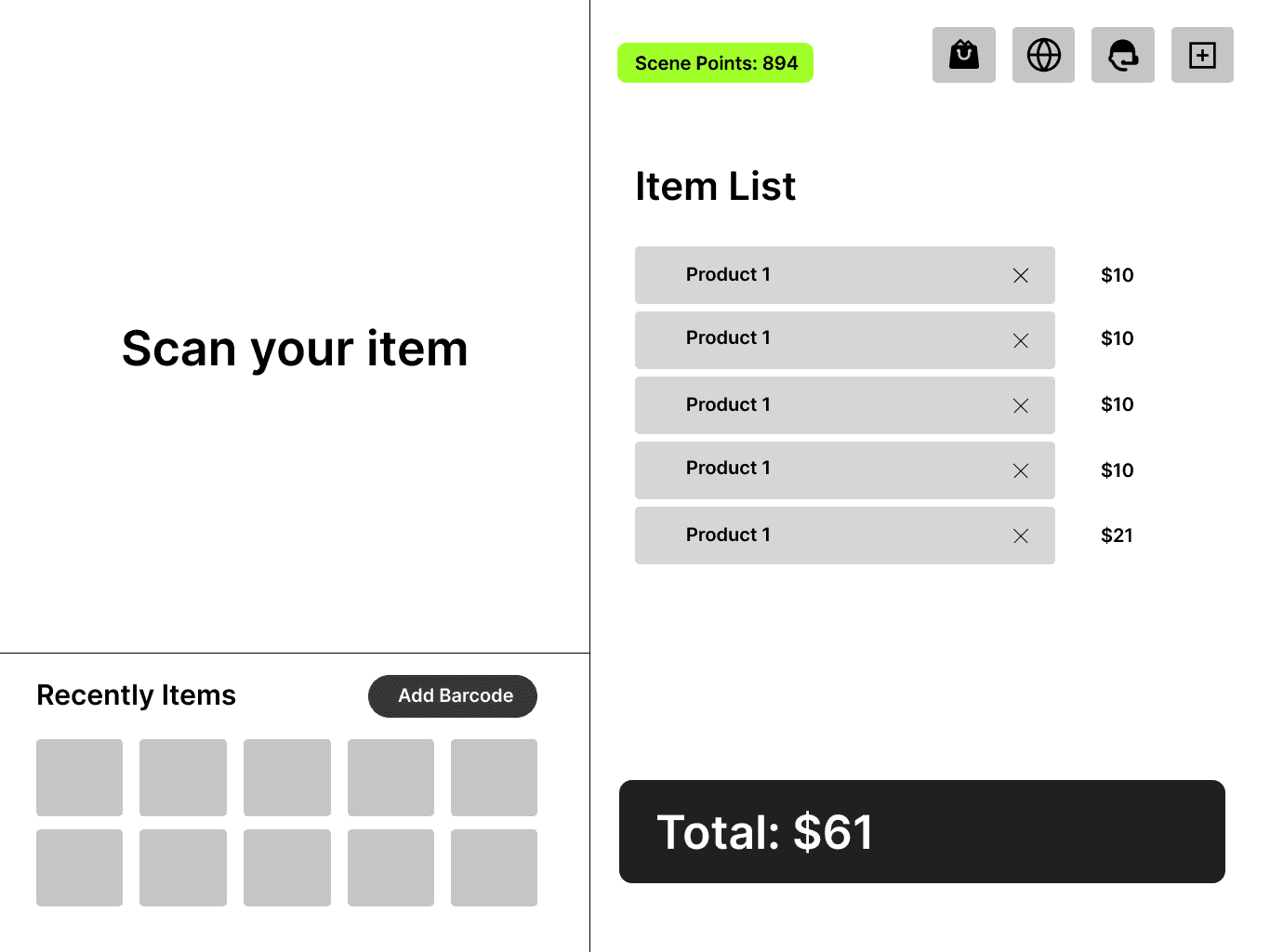
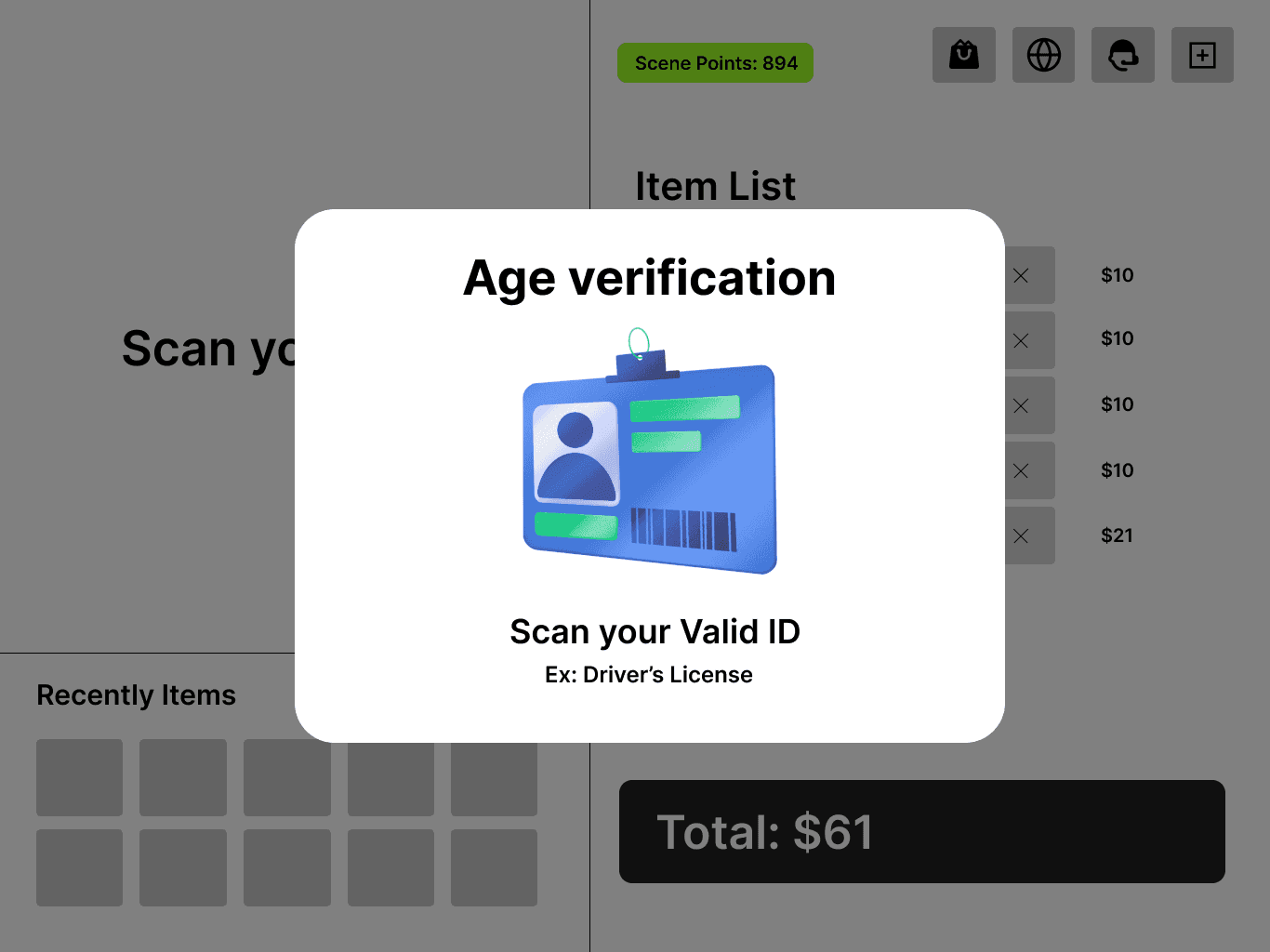
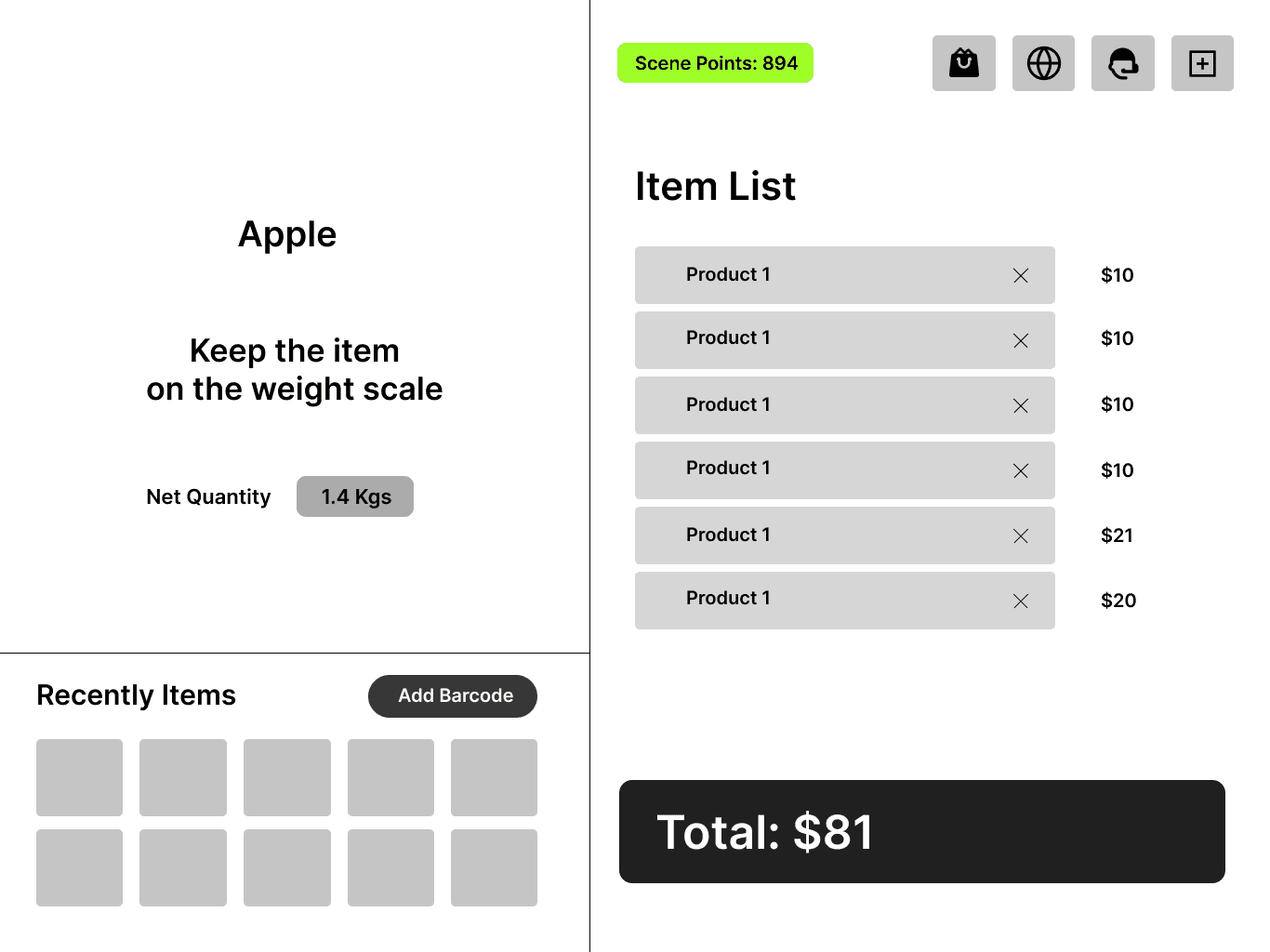
The aim is to design new self-checkout system at Loblaws to simplify the process for everyone. If users encounter an issue, they can easily call for assistance with the press of a button. Additionally, if an item doesn't scan, users can manually input the numbers or select from a list of commonly purchased items without barcodes. Before finalizing payment, users can review their items, allowing them to correct any mistakes. This approach aims to minimize confusion and instill confidence in users as they check out their groceries.
The aim is to design new self-checkout system at Loblaws to simplify the process for everyone. If users encounter an issue, they can easily call for assistance with the press of a button. Additionally, if an item doesn't scan, users can manually input the numbers or select from a list of commonly purchased items without barcodes. Before finalizing payment, users can review their items, allowing them to correct any mistakes. This approach aims to minimize confusion and instill confidence in users as they check out their groceries.
Existing Screens
Welcome Screen

Scan Screen
List of Items
Payment Screen
Restart - Process

1.
Easy way to select language
1.
2.
Start by scanning a product
3.
Easy access for assistance
1.
Scan your scene card to collect points
1.
2.
Basic options
3.
Items added will be displayed here
1.
1.
Scene points
2.
Add bags
4.
Recent items are displayed to avoid item search
3.
Items added will be displayed here
1.
1.
Scan Valid ID for age verification for buying liquor
1.
After selecting the non-bar code item, put the item on scale
1.

1.
Add number of bag required
1.
Easy way to select language
1.
2.
Start by scanning a product
3.
Easy access for assistance
1.
Scan your scene card to collect points
1.
2.
Basic options
3.
Items added will be displayed here
1.
1.
Scene points
2.
Add bags
4.
Recent items are displayed to avoid item search
3.
Items added will be displayed here
1.
1.
Scan Valid ID for age verification for buying liquor
1.
After selecting the non-bar code item, put the item on scale
1.
1.
Add number of bag required
1.
Easy way to select language
1.
2.
Start by scanning a product
3.
Easy access for assistance
1.
Scan your scene card to collect points
1.
2.
Basic options
3.
Items added will be displayed here
1.
1.
Scene points
2.
Add bags
4.
Recent items are displayed to avoid item search
3.
Items added will be displayed here
1.
1.
Scan Valid ID for age verification for buying liquor
1.
After selecting the non-bar code item, put the item on scale
1.
1.
Add number of bag required
1.
Easy way to select language
1.
2.
Start by scanning a product
3.
Easy access for assistance
1.
Scan your scene card to collect points
1.
2.
Basic options
3.
Items added will be displayed here
1.
1.
Scene points
2.
Add bags
4.
Recent items are displayed to avoid item search
3.
Items added will be displayed here
1.
1.
Scan Valid ID for age verification for buying liquor
1.
After selecting the non-bar code item, put the item on scale
1.
1.
Add number of bag required
1.
Easy way to select language
1.
2.
Start by scanning a product
3.
Easy access for assistance
1.
After selecting the non-bar code item, put the item on scale
1.
1.
Scan your scene card to collect points
1.
2.
Basic options
1.
Add number of bag required
3.
Items added will be displayed here
1.
1.
Scene points
2.
Add bags
4.
Recent items are displayed to avoid item search
3.
Items added will be displayed here
1.
1.
Scan Valid ID for age verification for buying liquor
1.
Easy way to select language
1.
2.
Start by scanning a product
3.
Easy access for assistance
1.
After selecting the non-bar code item, put the item on scale
1.
1.
Scan your scene card to collect points
1.
2.
Basic options
1.
Add number of bag required
3.
Items added will be displayed here
1.
1.
Scene points
2.
Add bags
4.
Recent items are displayed to avoid item search
3.
Items added will be displayed here
1.
1.
Scan Valid ID for age verification for buying liquor
1.
Easy way to select language
1.
2.
Start by scanning a product
3.
Easy access for assistance
1.
After selecting the non-bar code item, put the item on scale
1.
1.
Scan your scene card to collect points
1.
2.
Basic options
1.
Add number of bag required
3.
Items added will be displayed here
1.
1.
Scene points
2.
Add bags
4.
Recent items are displayed to avoid item search
3.
Items added will be displayed here
1.
1.
Scan Valid ID for age verification for buying liquor
1.
Easy way to select language
1.
2.
Start by scanning a product
3.
Easy access for assistance
1.
After selecting the non-bar code item, put the item on scale
1.
1.
Scan your scene card to collect points
1.
2.
Basic options
1.
Add number of bag required
3.
Items added will be displayed here
1.
1.
Scene points
2.
Add bags
4.
Recent items are displayed to avoid item search
3.
Items added will be displayed here
1.
1.
Scan Valid ID for age verification for buying liquor
1.
Easy way to select language
1.
2.
Start by scanning a product
3.
Easy access for assistance
1.
After selecting the non-bar code item, put the item on scale
1.
1.
Scan your scene card to collect points
1.
2.
Basic options
1.
Add number of bag required
3.
Items added will be displayed here
1.
1.
Scene points
2.
Add bags
4.
Recent items are displayed to avoid item search
3.
Items added will be displayed here
1.
1.
Scan Valid ID for age verification for buying liquor
1.
Easy way to select language
1.
2.
Start by scanning a product
3.
Easy access for assistance
1.
After selecting the non-bar code item, put the item on scale
1.
1.
Scan your scene card to collect points
1.
2.
Basic options
1.
Add number of bag required
3.
Items added will be displayed here
1.
1.
Scene points
2.
Add bags
4.
Recent items are displayed to avoid item search
3.
Items added will be displayed here
1.
1.
Scan Valid ID for age verification for buying liquor
1.
Easy way to select language
1.
2.
Start by scanning a product
3.
Easy access for assistance
1.
After selecting the non-bar code item, put the item on scale
1.
1.
Scan your scene card to collect points
1.
2.
Basic options
1.
Add number of bag required
3.
Items added will be displayed here
1.
1.
Scene points
2.
Add bags
4.
Recent items are displayed to avoid item search
3.
Items added will be displayed here
1.
1.
Scan Valid ID for age verification for buying liquor
1.
Easy way to select language
1.
2.
Start by scanning a product
3.
Easy access for assistance
1.
After selecting the non-bar code item, put the item on scale
1.
1.
Scan your scene card to collect points
1.
2.
Basic options
1.
Add number of bag required
3.
Items added will be displayed here
1.
1.
Scene points
2.
Add bags
4.
Recent items are displayed to avoid item search
3.
Items added will be displayed here
1.
1.
Scan Valid ID for age verification for buying liquor
High-Fidelity Wireframe
High-Fidelity Wireframe
Conclusion
Conclusion
76%
Out of 20 participants in the usability test, approximately
found the layout more convenient.
Out of 20 participants in the usability test, approximately 76% found the layout more convenient.
13
participants specifically noted that the "Add Bag" option was
found the layout more convenient.
13 participants specifically noted that the "Add Bag" option was found the layout more convenient
78%
About
of users felt a reduced need to call for assistance
About 78% of users felt a reduced need to call for assistance
15
On average,
seconds were saved due to the easy selection process
On average 15 Seconds were saved due to the easy selection process
I'd love to hear from you!
I'd love to hear from you!
I'd love to hear from you!
If you have a project in mind or just want to say hello, feel free to reach out to me.
If you have a project in mind or just want to say hello, feel free to reach out to me.
let's connect
let's connect
let's connect